

If you can’t remember your HBO Max password, don’t worry. Use the Forgot Password feature to reset it. In this article, we will guide you through the steps to reset your password, get back into your account, and enjoy all the shows and movies on HBO Max.
In case you’ve forgotten your HBO Max password, here’s how to reset it on a Mac or PC using a browser.
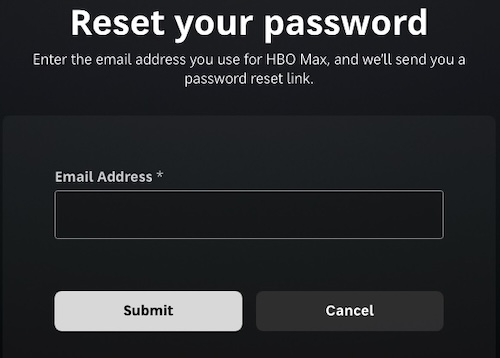
Now you can sign in to HBO Max with your account email and your new password. Keep in mind that your new password should be at least 10 characters long with no more than 4 repeating characters in a row.
The steps for resetting your HBO Max password on mobile devices are as follows:
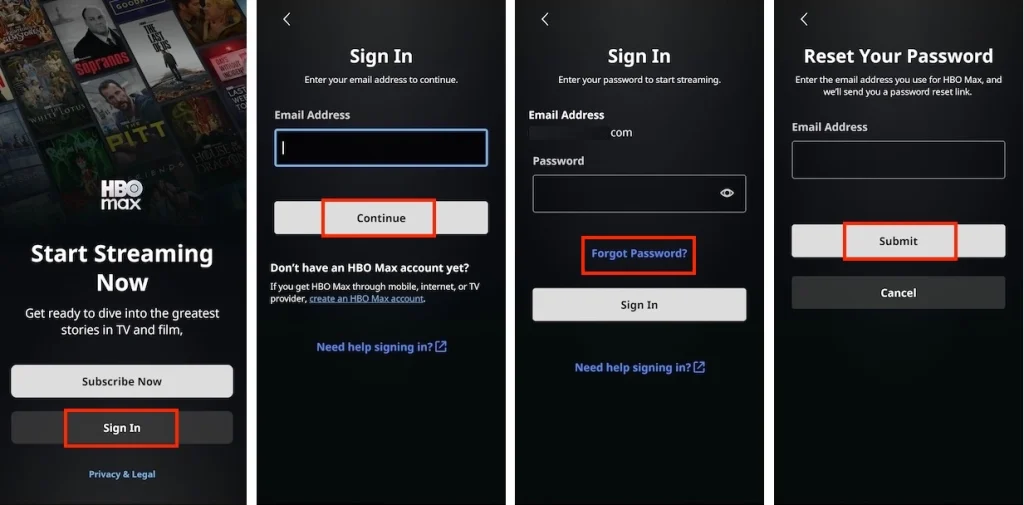
After successfully resetting your HBO Max password, you can use your account email and the new password to sign in and start streaming on HBO Max.
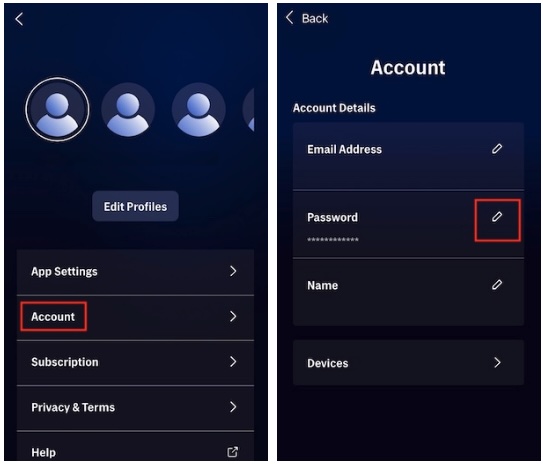
For security or other concerns, you might need to change your HBO Max password. You can follow the same steps below to change your HBO Max password on a browser, PC, Mac, phone, or tablet while logged into your account.
Once your password is updated, you will need to sign in to all devices with your updated password.
The HBO Max app allows you to save shows and movies for offline viewing. Yet, there are several constraints to consider: downloads are exclusive to ad-free plans, content can only be downloaded on mobile devices, and there’s a download cap. Once you start watching a download, you need to finish it within 48 hours before it expires, while unwatched content lasts for 30 days. Upon expiration, you need to renew or remove the download.
If you are seeking an unrestricted download capacity and the freedom to watch without time limitations, the Pazu HBO Max Video Downloader is your optimal choice. It allows you to download movies and TV shows even with the HBO Max ad-supported tier.
With the Pazu HBO Max Video Downloader, you can easily download movies and TV shows in high-definition quality. It enables downloading from HBO Max through name search and URL recognition. Moreover, the tool captures subtitles and audio tracks in multiple languages simultaneously, so you don’t need to worry about language barriers at all. It provides three subtitle options: External, Internal, and Hardcore subtitles.
Empowered by Pazu HBO Max Video Downloader, you can not only save HBO Max videos forever but also watch them on any TV and other supported devices freely.

Pazu HBO Max Video Downloader
Follow the tutorial below to download HBO Max movies and TV shows to MP4.
Download, install, and launch Pazu HBO Max Video Downloader on your desktop. Click the HBO Max icon and log in to your HBO Max account.
If you have purchased a license for the downloader, click the Settings icon (three-line icon at the upper right) > “Register” and enter your registration code to unlock the full version. Otherwise, continue with the free trial version.

Click the Settings icon in the top right corner and select “Preferences” to customize the video format, codec, audio and subtitle languages, output folder, etc.

Search for a movie or TV show by entering the name under the search tab. You will get the same results as you search from the HBO Max website or app.
Or you can copy and paste the link of the movie or show from the HBO Max website. Then click the Search icon.

For a movie, click the Download icon next to it to initiate the download.
For a TV show, click the Download icon to select specific episodes for download. Then click the Download button at the bottom right to start downloading.
You can also customize subtitles and audio tracks for a movie or each episode of a show by clicking on the lines-and-gear icon. Click “OK” to close the Audio/Subtitle Windows after you’ve chosen the desired languages.

After the download completes, click History to locate the video in MP4 format quickly. You can now transfer the downloaded videos and watch them whenever you want.

Related articles

Download HBO Max Video movies and TV shows to MP4/MKV on your PC/Mac