

For many people, Netflix is one of the most-used apps on their phones, tablets as well as TVs. Whether to kill time while traveling or commuting, Netflix is a primary choice. And besides a wealth of content on tap, Netflix offers other features that subscribers enjoy – like the ability to download its movies and TV shows for offline viewing. It will be beneficial for users in terms of not having to worry about interrupting playback due to a poor internet connection. However, there are indeed many limitations. Here in this article, we will list the Netflix download limits and the best solution to bypass all limits.
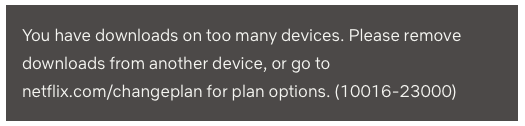
Netflix sets limits on how many devices you can download movies and TV shows on. The amount of devices is determined by your subscription plan: 2 devices for Standard with ads and Standard plans, and 6 devices for the Premium plan. So when you are downloading Netflix videos on more than the limited number of devices, you will get this error. To fix this, you need to remove downloads from another device or go to netflix.com/changeplan to upgrade your plan.
Downloaded content from Netflix doesn’t last forever. It was only watchable for a certain time period after downloading. Some have a limit on how many times they can be downloaded per year. Downloads will expire after a period of time. The amount of time depends on individual licenses, and can vary by title. If a title has expired, you will need to renew it. Some titles may only be renewed a certain number of times.

This error is related to the one above. As we mentioned earlier, some content rights holders allow a fixed number of downloads for their creations. In this case, makers put a restriction on the number of downloads per year.
Every day, there are some titles that leave Netflix because of licensing agreements. If a TV show or movie is leaving Netflix, you will find a “Last day to watch on Netflix” message in the details page of the TV show or movie.
If your downloaded TV shows start disappearing, the chances are that the Smart Downloads feature is enabled. This feature deletes the episode you’ve watched only to replace it with the next one.
If you are using iPhone/iPad, downloaded videos may be automatically deleted when this device is running low on storage.

Sometimes the download does not start even if you click the download button several times. Or in some cases, the download does not resume at all even if you click the Update button.
In such cases, check your internet connection (Wi-fi connection is recommended )and restart the Netflix app.
If you see the error on your Android phone or tablet, it indicates that the download feature is not supported on your device. Because a wide variety of devices with different capabilities use the Android OS, certain Android devices are not compatible with the download feature.
The best option to bypass Netflix Download Limits is to download Netflix movies and TV shows to MP4 with Pazu Netflix Video Downloader on your Windows or Mac. By downloading Netflix videos to MP4 and saving them on your computer, USB drive, SD card or external hard drive, you can preserve the videos forever and play them anywhere you want without Netflix app. They won’t be expired, removed or disappear.
Pazu Netflix Video Downloader is a desktop program for Netflix users to download Netflix videos without Netflix app. It can bypass the DRM from Netflix and download movies and TV shows from Netflix to MP4 and MKV. The converted music can be preserved in high quality as 1080p after a fast download process. Also, subtitles and audio tracks can be kept 100% the same as the original video.

Download Netflix movies & TV shows to MP4 with HD quality.
Select the Netflix icon and log in to your Netflix account. Click the key icon and enter your registration code to unlock the full version if you have purchased a registration. If you haven’t, go ahead with the free trial version.

For movies or shows going to leave Netflix, downloading them with Pazu Netflix Video Downloader can save them to MP4 on your local drive and preserve them forever. Click the Search tab on top and enter the title of a movie/TV show in the search field and click the search icon. You will see all shows in the list.

Click on the Settings button in the upper right corner and select “Preferences” to change:

Click Download icon on the right side.
As you can see from the screenshot, all episodes are checked by default. Netflix Video Downloader will help you download them, no need to tap one by one.

Then click Download button in the bottom right corner. The downloading begins.

After downloading, click History and find the video in MP4 format. You can now transfer the downloaded videos to USB drive. Insert the USB drive to your TV’s USB port and watch them whenever you want.
Netflix allows you to download movies and TV shows to watch offline. However, there are many limits to push you to subscribe to the most expensive plan or keep your subscription as long as possible. If you get an error while downloading or after downloading Netflix videos, check this article for the reason. You can also get Pazu Netflix Video Downloader to download Netflix movies and TV shows to MP4 and bypass all Netflix download limits.

Download Netflix movies and TV shows to MP4/MKV on your PC/Mac