

“I was wondering if anyone knew the process used and needed to rip movies or TV shows from streaming services Hulu, so I can save them onto my PC (I want to keep old cartoons in my native language, as I can’t find any torrents in Latin American Spanish). Thanks in advance.”
Do you have the same confusion? Hulu only allows Hulu (No Ads) subscribers to download TV shows and movies on supported mobile devices. To rip videos from Hulu on Mac/Windows, a simple method is to use a screen recorder software, record the display capture whilst also recording audio output, leave the program running and it’s all recorded. But this is not recommended if you’re an audiophile, as the quality isn’t super good.

Here in this post, we will show you 4 tools to rip movies and TV shows from Hulu to MP4 on Mac and Windows.
Contents
Free online screen recorder is an easy-to-use online screen recorder that allows you to capture your screen, sound, and webcam. It is compatible with browsers: Google Chrome, Mozilla Firefox, Microsoft Edge, and Opera.
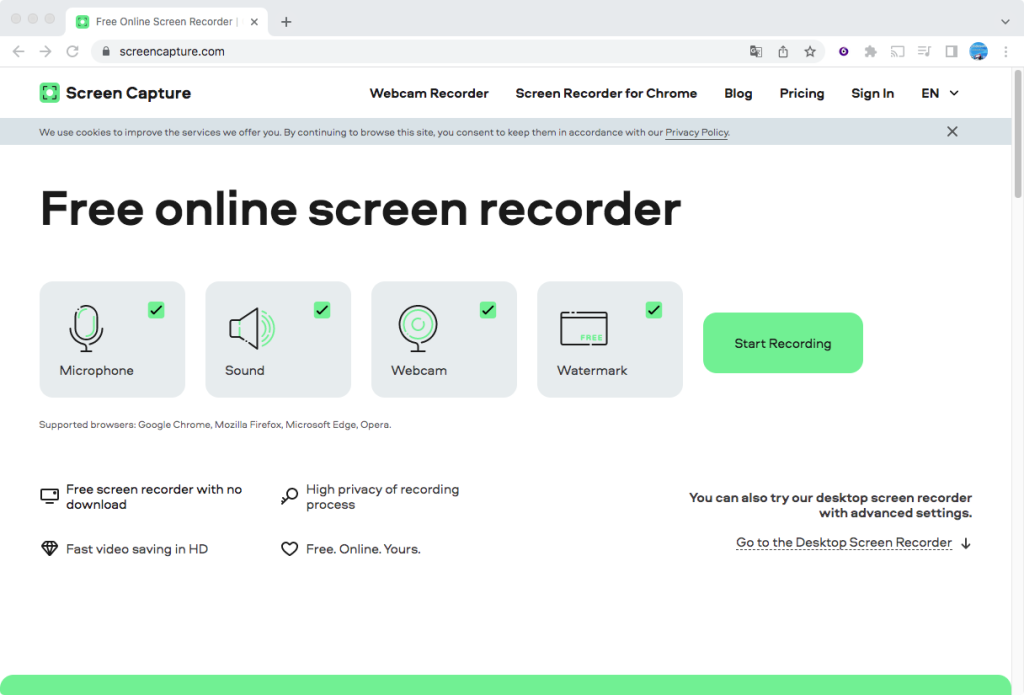
The free online tool rips Hulu movies and TV shows with a watermark. You can also get its desktop app for Mac and Windows called Movavi Screen Recorder and purchase a license to remove watermark.
Price: $9.95/month or $39.95/year
EaseUS RecExperts is a screen recording software developed by EaseUS. EaseUS RecExperts is designed to capture video and audio from your computer screen, webcam, or both.
Key features of EaseUS RecExperts:
How to rip Hulu movies and TV shows with EaseUS RecExperts?

Price: $19.95/month, $69.95/Year, $119.95/Lifetime
PlayOn Cloud is a mobile app on iOS and Android that lets you rip and download from streaming services like Netflix, Disney+, Hulu, Prime Video, HBO, The CW, Peacock, and more. You can use it to rip Hulu movies/TV shows from your mobile device. The ripped video will be temporarily stored in a complimentary cloud “locker” and available for download from anywhere on any device.
Just install the PlayOn Cloud app from Google Play or the App Store and create an account. Select Hulu and log in to your Hulu account. Browse or search to find the movie or show you want to rip from Hulu, and click on record. You will be able to download ripped videos to your computer, tablet, or mobile device.
PlayOn records Hulu videos in real-time.


Price: Starting from $4.99 for 30 recording credits and 100GB storage each month. Cancel anytime.
Actually, screen recording is not a good choice to rip Hulu video right to your device as it is very time-consuming. The best way to rip Hulu movies and TV shows is to use professional Hulu video downloader.
Luckily you can easily rip tons of shows and movies from the Hulu streaming library to MP4/MKV on Mac and Windows with the third-party tool – Pazu Hulu Video Downloader. Pazu Hulu Video Downloader for Mac is developed for you to download tons of movies, TV shows, or Hulu original series from Hulu to MP4 or MKV format on Mac/Windows with excellent quality and fast speed.

Rip Hulu movies & TV shows to MP4 with HD quality.
Pazu Hulu Video Downloader lets users rip various movies, TV shows, or Hulu original series from Hulu to MP4 or MKV format with excellent quality and fast speed. The downloaded movies and TV shows are still playable even after you cancel your Hulu account or Spotify Premium student subscription.
Download, install and launch Pazu Hulu Video Downloader on your Mac or Windows. Click the HULU icon, choose hulu.com or hulu.jp, and log in to your Hulu account.

Select a profile.

Click the Search tab at the top and paste the URL link of the Hulu movie/TV show you want to rip or enter the title in the search field. Click the search icon. You’ll be able to view a list of all available titles within a few seconds.

Copy&paste the link of the movie/TV show from the Hulu website. Then click the Search icon.

Click the 3-lines icon on the top right corner – Preferences to change:
Subtitle types:

If your selection is a movie, click the download icon next to it and the download begins.

If you want to rip a TV show, click the download icon next to it to select episodes you want to rip. Then click the Download button.

After the movie is downloaded, click the folder to quickly locate it.

Once you have ripped Hulu movies and TV shows, you can:
Related articles

Download Hulu Video movies and TV shows to MP4/MKV on your PC/Mac